Showing posts with label organization. Show all posts

Getting Ready for the New Year Part 2

Getting ready for the new year part 2; tpt; teacherspayteachers

Getting Ready for the New Year - Part 1 here and Part 3 here.

❖ Before I move on to the new year I like to review the current year. So take a look at 2018 and see how far you've come this year. Here are some questions to help you reflect.

☞ What are all of the things you accomplished?
☞ Are there any goals you didn't accomplish yet? (That's okay!)
☞ What went well for you during 2018?
☞ What did not go well for you? Can you make any changes to help this?
☞ What products sold well?
☞ What were you most excited about - the highlight of the year?

❖ After reflecting on the old year, it's time to get started on plans for the new year. Here are some of the things I do to plan and prepare: 

 Update planner, print, and bind. 
If you are looking for a Seller Planner, you can find mine here
I've been using and tweaking it for the last 3-4 years.
TPT Seller Planner; Getting ready for the new year
 Think about 3-5 big goals for the year (consider things such as revenue, products, store, learning, etc)
 Sketch out some plans on a year-long calendar
 Update my spreadsheets. 
If you are looking for a Data Tracking Sheets, you can find mine here
I've been using and tweaking them for the last 5 years.
TPT Data Tracking Spreadsheets; Getting ready for the new year

❖ If you are looking for some help with planning, goal setting, data tracking, or selling, check out the seller resources in my store

❖ More Tips for selling on TPT can be found in posts in the FB Group: TpT Seller Tips and Advice. Come join us as you work towards a productive and successful 2019!

Getting Ready for the New Year


Getting Ready for the New Year - Find Part 2 here and Part 3 here.

Here are 5 tips to help you have a successful New Year.

1) Be organized. When you know where things are and have a somewhat clean space to work in, you'll be more likely to get things done.

2) Have a written plan. When you keep it all in your head, chances are you will forget something. It will also take more time to get going. Write out your plan the night before (if you just do a daily plan) or on Sunday (if you do a weekly plan). You will get more accomplished this way.

If you are looking for a Seller Planner, you can find mine here. I've used and tweaked this planner for the last 3-4 years.
TPT Seller Planner; getting ready for the new year

3) Get rid of distractions. Turn off the phone, the notifications, FB, email, the tv, etc. When you are focused on your task, more is accomplished.

4) Let perfectionism go. You don't have to be perfect on each and every product. They need to be professional. They don't need to include everything under the sun. At some point, you just need to let go, stop adding to the product, and post it. You can't sell it if it isn't in your store.

5) Be productive, not just busy. Being productive - engaging in the production of goods or other important activities to move you store forward. Being busy - doing things that don't necessarily matter, the unimportant tasks that don't move the needle. I can spend my day reading FB posts, reading emails, posting quotes on IG, reading the Forums, etc., but it doesn't get a product completed or pins created.

❖ If you are looking for some help with planning, goal setting, data tracking, or selling, check out the seller resources in my store

 More tips for TPT sellers can found in posts in the FB Group: TPT Seller Tips and Advice. Come join us as you work towards a productive and successful 2019!

Organizing Your Computer Files

Organizing Your Computer Files for TPT
Everyone has a different way to organize. This system has worked for me for several years.

I start with a main folder for Teachers Pay Teachers. Inside that folder, I break it down into some categories: Marketing, Completed Products, Products to Finish, Data, etc.
Organizing Your Computer Files for TPT: Main TPT Categories


I then break each of those folders down. For example inside the Completed Products Folder is a folder for each product I have created. Inside the product folder is a copy of the product, a copy of the preview, and the editable pieces for the product.
Organizing Your Computer Files for TPT: Each Product has its own folder
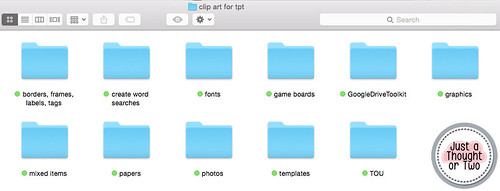
In my Design Tools folder, I have a Clip Art for TPT folder. Inside are several category folders including graphics, photos, borders, etc. I keep each product together inside the category. I don't group them by theme or artist.
Organizing Your Computer Files for TPT: Organized by Type of Clip Art
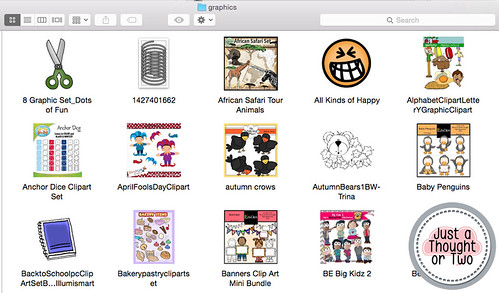
I did change the folder preview to the clip art preview to help me find things easier. On my Mac, I use Image2icon, which is a free download, to change my folder preview.
Organizing Your Computer Files for TPT: Graphics by Product
This keeps me organized. Of course, I am terrible at putting things in the right folder when I download something. So every now and then I have to go in and clean up my folders. In fact, it is time to straighten them up.

I encourage you to find a system that works best for you!